
675 lines
22 KiB
Markdown
675 lines
22 KiB
Markdown
---
|
|
title: How Does Svelte Actually Work? part 1
|
|
published: true
|
|
description: A conversational, thinking-out-loud tour of the JavaScript that Svelte outputs
|
|
tags: svelte, javascript
|
|
---
|
|
Here's part 2:
|
|
|
|
{% link https://dev.to/zev/how-does-svelte-actually-work-part-2-3gbp %}
|
|
|
|
A friend put Svelte on the map for me this summer. Rather than tout its performance relative to the frameworks of the day, he touted the bite-sizedness and readability of the JavaScript it generates when compiled.
|
|
|
|
I'm writing a course that uses Svelte (and FastAPI and some other snazzy things) and am realizing that I could use some deeper knowledge of how Svelte operates: Specifically, how the code works that Svelte compiles to.
|
|
|
|
I'll post my insights as they come about, so this is part 1 of `x`.
|
|
|
|
# First Steps
|
|
|
|
I used the template provided by the Svelte project by doing
|
|
`npx degit sveltejs/template my-svelte-project; cd $_; npm install`.
|
|
|
|
Then I ran `npm run dev` to compile the included component and start the development server.
|
|
|
|
This produced [`build/bundle.js`](https://gist.github.com/zevaverbach/83901aed1230fbd3adb01b96a7be0572), the beast we'll be dissecting.
|
|
|
|
# Start at the Bottom
|
|
|
|
```js
|
|
// build/bundle.js (all code blocks are from this file unless otherwise specified)
|
|
...
|
|
const app = new App({
|
|
target: document.body,
|
|
props: {
|
|
name: 'world'
|
|
}
|
|
});
|
|
|
|
return app;
|
|
|
|
}());
|
|
//# sourceMappingURL=bundle.js.map
|
|
```
|
|
|
|
I didn't know what a source map is, but having Googled it and inspected `bundle.js.map` a little, I've decided not to try to decipher it just yet!
|
|
|
|
Those parens at the end tell me that the `app` var on line 3 of `bundle.js`
|
|
|
|
```js
|
|
...
|
|
var app = (function () {
|
|
...
|
|
```
|
|
|
|
stores the result of `return app`, as everything on the right-hand side of that 👆👆 `=` is an anonymous function which immediately calls itself.
|
|
|
|
Then, the above block, starting with `const app`, is identical to the logic in `main.js`.
|
|
|
|
```js
|
|
// src/main.js
|
|
|
|
import App from './App.svelte';
|
|
|
|
const app = new App({
|
|
target: document.body,
|
|
props: {
|
|
name: 'world',
|
|
}
|
|
});
|
|
|
|
export default app;
|
|
```
|
|
|
|
Searching for `main.js` in the Rollup config file that came with this sample app, I see
|
|
|
|
```js
|
|
// rollup.config.js
|
|
...
|
|
input: 'src/main.js',
|
|
...
|
|
```
|
|
|
|
Okay, I'm reminded that this is where the Svelte app is defined, as configured in `rollup.config.js`.
|
|
|
|
# The App: First Hypothesis
|
|
|
|
It looks like the `App` class has `get` and `set` methods on it, each called `name`.
|
|
|
|
```js
|
|
...
|
|
class App extends SvelteComponentDev {
|
|
constructor(options) {
|
|
super(options);
|
|
init(this, options, instance, create_fragment, safe_not_equal, { name: 0 });
|
|
|
|
dispatch_dev("SvelteRegisterComponent", {
|
|
component: this,
|
|
tagName: "App",
|
|
options,
|
|
id: create_fragment.name
|
|
});
|
|
|
|
const { ctx } = this.$$;
|
|
const props = options.props || ({});
|
|
|
|
if (/*name*/ ctx[0] === undefined && !("name" in props)) {
|
|
console.warn("<App> was created without expected prop 'name'");
|
|
}
|
|
}
|
|
|
|
get name() {
|
|
throw new Error("<App>: Props cannot be read directly from the component instance unless compiling with 'accessors: true' or '<svelte:options accessors/>'");
|
|
}
|
|
|
|
set name(value) {
|
|
throw new Error("<App>: Props cannot be set directly on the component instance unless compiling with 'accessors: true' or '<svelte:options accessors/>'");
|
|
}
|
|
}
|
|
|
|
...
|
|
```
|
|
|
|
I hypothesize that if I give `App` another prop, there will be a pair of `get` and `set` for that as well.
|
|
|
|
## Testing Hypothesis #1
|
|
|
|
```html
|
|
<!-- src/App.svelte -->
|
|
|
|
<script>
|
|
export let name;
|
|
export let number; // new
|
|
</script>
|
|
|
|
```
|
|
|
|
Sure enough, these methods have appeared:
|
|
|
|
```js
|
|
...
|
|
get name() {
|
|
throw new Error("<App>: Props cannot be read directly from the component instance unless compiling with 'accessors: true' or '<svelte:options accessors/>'");
|
|
}
|
|
|
|
set name(value) {
|
|
throw new Error("<App>: Props cannot be set directly on the component instance unless compiling with 'accessors: true' or '<svelte:options accessors/>'");
|
|
}
|
|
|
|
get number() {
|
|
throw new Error("<App>: Props cannot be read directly from the component instance unless compiling with 'accessors: true' or '<svelte:options accessors/>'");
|
|
}
|
|
|
|
set number(value) {
|
|
throw new Error("<App>: Props cannot be set directly on the component instance unless compiling with 'accessors: true' or '<svelte:options accessors/>'");
|
|
}
|
|
...
|
|
```
|
|
|
|
So that's how that works. I don't know much about how getters/setters work in JS classes, but I'm guessing it's like in Python: They trigger when you try to get or set an instance attribute.
|
|
|
|
Then there's this in the constructor of `App`:
|
|
|
|
```js
|
|
if (/*name*/ ctx[0] === undefined && !("name" in props)) {
|
|
console.warn("<App> was created without expected prop 'name'");
|
|
}
|
|
|
|
if (/*number*/ ctx[1] === undefined && !("number" in props)) {
|
|
console.warn("<App> was created without expected prop 'number'");
|
|
}
|
|
```
|
|
This `ctx` thing is mysterious, and it's popped off of the even more mysterious `this.$$`.
|
|
|
|
```js
|
|
class App extends SvelteComponentDev {
|
|
constructor(options) {
|
|
...
|
|
const { ctx } = this.$$;
|
|
...
|
|
```
|
|
|
|
We'll come back to these.
|
|
|
|
Before continuing, let's update `main.js` to provide a value for the `number` prop.
|
|
|
|
```js
|
|
// src/main.js
|
|
...
|
|
const app = new App({
|
|
target: document.body,
|
|
props: {
|
|
name: 'world',
|
|
number: 42
|
|
}
|
|
});
|
|
```
|
|
|
|
# Everything Starts in `create_fragment`
|
|
|
|
```js
|
|
function create_fragment(ctx) {
|
|
let main;
|
|
let h1;
|
|
let t0;
|
|
let t1;
|
|
let t2;
|
|
let t3;
|
|
let p;
|
|
let t4;
|
|
let a;
|
|
let t6;
|
|
|
|
const block = {
|
|
c: function create() {
|
|
main = element("main");
|
|
h1 = element("h1");
|
|
t0 = text("Hello ");
|
|
t1 = text(/*name*/ ctx[0]);
|
|
t2 = text("!");
|
|
t3 = space();
|
|
p = element("p");
|
|
t4 = text("Visit the ");
|
|
a = element("a");
|
|
a.textContent = "Svelte tutorial";
|
|
t6 = text(" to learn how to build Svelte apps.");
|
|
attr_dev(h1, "class", "svelte-1tky8bj");
|
|
add_location(h1, file, 5, 1, 46);
|
|
attr_dev(a, "href", "https://svelte.dev/tutorial");
|
|
add_location(a, file, 6, 14, 83);
|
|
add_location(p, file, 6, 1, 70);
|
|
attr_dev(main, "class", "svelte-1tky8bj");
|
|
add_location(main, file, 4, 0, 38);
|
|
},
|
|
l: function claim(nodes) {
|
|
throw new Error("options.hydrate only works if the component was compiled with the `hydratable: true` option");
|
|
},
|
|
m: function mount(target, anchor) {
|
|
insert_dev(target, main, anchor);
|
|
append_dev(main, h1);
|
|
append_dev(h1, t0);
|
|
append_dev(h1, t1);
|
|
append_dev(h1, t2);
|
|
append_dev(main, t3);
|
|
append_dev(main, p);
|
|
append_dev(p, t4);
|
|
append_dev(p, a);
|
|
append_dev(p, t6);
|
|
},
|
|
p: function update(ctx, [dirty]) {
|
|
if (dirty & /*name*/ 1) set_data_dev(t1, /*name*/ ctx[0]);
|
|
},
|
|
i: noop,
|
|
o: noop,
|
|
d: function destroy(detaching) {
|
|
if (detaching) detach_dev(main);
|
|
}
|
|
};
|
|
|
|
dispatch_dev("SvelteRegisterBlock", {
|
|
block,
|
|
id: create_fragment.name,
|
|
type: "component",
|
|
source: "",
|
|
ctx
|
|
});
|
|
|
|
return block;
|
|
}
|
|
|
|
|
|
|
|
```
|
|
|
|
`create_fragment` is a function that takes a single argument `ctx`, and its job is primarily to create and render DOM elements; it returns `block`.
|
|
|
|
## `block`
|
|
|
|
`block` is an object whose most important attributes are `c` (create), `m` (mount), `p` (update), `d` (destroy).
|
|
|
|
### `c` (create)
|
|
|
|
`block.c`'s value is a factory function called `create`, which
|
|
|
|
```js
|
|
c: function create() {
|
|
main = element("main");
|
|
h1 = element("h1");
|
|
t0 = text("Hello ");
|
|
t1 = text(/*name*/ ctx[0]);
|
|
t2 = text("!");
|
|
t3 = space();
|
|
p = element("p");
|
|
t4 = text("Visit the ");
|
|
a = element("a");
|
|
a.textContent = "Svelte tutorial";
|
|
t6 = text(" to learn how to build Svelte apps.")
|
|
...
|
|
```
|
|
|
|
1) creates a bunch of DOM elements and text nodes
|
|
2) assigns them each to a variable declared at the start of `create_fragment`
|
|
|
|
Then it
|
|
|
|
```js
|
|
...
|
|
attr_dev(h1, "class", "svelte-1tky8bj");
|
|
add_location(h1, file, 5, 1, 46);
|
|
attr_dev(a, "href", "https://svelte.dev/tutorial");
|
|
add_location(a, file, 6, 14, 83);
|
|
add_location(p, file, 6, 1, 70);
|
|
attr_dev(main, "class", "svelte-1tky8bj");
|
|
add_location(main, file, 4, 0, 38);
|
|
}
|
|
```
|
|
|
|
3) sets attributes (like 'class' and 'href') on the elements
|
|
4) dispatches an event for each attribute-setting (more on that later: we can safely ignore these events forever).
|
|
5) adds metadata to each element (`__svelte_meta`) detailing exactly where it's defined in the `src` modules.
|
|
|
|
### `m` (mount)
|
|
|
|
`block.m`'s value is a factory function called `mount`, which, y'know, adds each element and text node to the DOM in the appropriate place.
|
|
|
|
```js
|
|
m: function mount(target, anchor) {
|
|
insert_dev(target, main, anchor);
|
|
append_dev(main, h1);
|
|
append_dev(h1, t0);
|
|
append_dev(h1, t1);
|
|
append_dev(h1, t2);
|
|
append_dev(main, t3);
|
|
append_dev(main, p);
|
|
append_dev(p, t4);
|
|
append_dev(p, a);
|
|
append_dev(p, t6);
|
|
},
|
|
|
|
```
|
|
|
|
### `p` (update)
|
|
|
|
`block.p`'s value is _not_ a factory function, but a plain old function which seems to
|
|
|
|
```js
|
|
p: function update(ctx, [dirty]) {
|
|
if (dirty & /*name*/ 1) set_data_dev(t1, /*name*/ ctx[0]);
|
|
},
|
|
```
|
|
|
|
1) do something with bits that I don't understand, but probably just checks whether there's anything to update (`dirty`)
|
|
2) if the new value (`ctx[0]`) differs from `t1`'s value (`undefined` by default),
|
|
3) update `t1`'s value -- it's a text node, as a reminder
|
|
|
|
### Hypothesis #2
|
|
|
|
I notice here that the prop we added in the first hypothesis, `number`, doesn't appear in the `update` function. I'm thinking this is because it's not used anywhere in the component: It's an unused prop.
|
|
|
|
#### Testing Hypothesis #2
|
|
|
|
```html
|
|
<!-- src/App.svelte -->
|
|
...
|
|
<main>
|
|
<h1>Hello {name}!</h1>
|
|
<p>Your lucky number is {number}.</p> <!-- 👈👈👈 new -->
|
|
<p>Visit the <a href="https://svelte.dev/tutorial">Svelte tutorial</a> to learn how to build Svelte apps.</p>
|
|
</main>
|
|
...
|
|
```
|
|
|
|
```js
|
|
// build/bundle.js
|
|
...
|
|
p: function update(ctx, [dirty]) {
|
|
if (dirty & /*name*/ 1) set_data_dev(t1, /*name*/ ctx[0]);
|
|
if (dirty & /*number*/ 2) set_data_dev(t5, /*number*/ ctx[1]);
|
|
},
|
|
...
|
|
```
|
|
|
|
Ding ding ding! I'm still not sure about this `if (dirty & 2)` business; we'll kick that can for now.
|
|
|
|
### `d` (destroy)
|
|
|
|
`block.d`'s value is a function which -- shock and awe -- removes an element from the DOM.
|
|
|
|
```js
|
|
d: function destroy(detaching) {
|
|
if (detaching) detach_dev(main);
|
|
```
|
|
|
|
# Where is `block` consumed?
|
|
|
|
`create_fragment` is only called once in `bundle.js`, which makes sleuthing pretty easy:
|
|
|
|
```js
|
|
...
|
|
$$.fragment = create_fragment ? create_fragment($$.ctx) : false;
|
|
...
|
|
```
|
|
|
|
This is inside of the monster `init` function, which is itself called only in the constructor of the `class App` definition. What is this `create_fragment ? ...` ternary about? It seems like `create_fragment` will always be truthy, given that it... exists? The more fruitful question is probably where and how is `$$.fragment` used? Where? In three places, it turns out. How?
|
|
|
|
## `init`
|
|
|
|
```js
|
|
...
|
|
function init(component, options, instance, create_fragment, not_equal, props, dirty = [-1]) {
|
|
const parent_component = current_component;
|
|
set_current_component(component);
|
|
const prop_values = options.props || {};
|
|
const $$ = component.$$ = {
|
|
fragment: null,
|
|
ctx: null,
|
|
// state
|
|
props,
|
|
update: noop,
|
|
not_equal,
|
|
bound: blank_object(),
|
|
// lifecycle
|
|
on_mount: [],
|
|
on_destroy: [],
|
|
before_update: [],
|
|
after_update: [],
|
|
context: new Map(parent_component ? parent_component.$$.context : []),
|
|
// everything else
|
|
callbacks: blank_object(),
|
|
dirty
|
|
};
|
|
let ready = false;
|
|
$$.ctx = instance
|
|
? instance(component, prop_values, (i, ret, value = ret) => {
|
|
if ($$.ctx && not_equal($$.ctx[i], $$.ctx[i] = value)) {
|
|
if ($$.bound[i])
|
|
$$.bound[i](value);
|
|
if (ready)
|
|
make_dirty(component, i);
|
|
}
|
|
return ret;
|
|
})
|
|
: [];
|
|
$$.update();
|
|
ready = true;
|
|
run_all($$.before_update);
|
|
// `false` as a special case of no DOM component
|
|
$$.fragment = create_fragment ? create_fragment($$.ctx) : false;
|
|
if (options.target) {
|
|
if (options.hydrate) {
|
|
// eslint-disable-next-line @typescript-eslint/no-non-null-assertion
|
|
$$.fragment && $$.fragment.l(children(options.target));
|
|
}
|
|
else {
|
|
// eslint-disable-next-line @typescript-eslint/no-non-null-assertion
|
|
$$.fragment && $$.fragment.c();
|
|
}
|
|
if (options.intro)
|
|
transition_in(component.$$.fragment);
|
|
mount_component(component, options.target, options.anchor);
|
|
flush();
|
|
}
|
|
set_current_component(parent_component);
|
|
}
|
|
|
|
...
|
|
```
|
|
|
|
`$$.fragment` is referred to three times directly after its creation in `init`. Since only `target` is in the `options` of the sample app, we'll ignore all but the second, `$$.fragment && $$.fragment.c();`. Similar to the previous step, I don't understand the boolean check here of `$$.fragment && ...`, but what's notable is that `fragment`'s `c` method is called, which will create—but not mount—all the elements and text nodes, giving the elements metadata about their pre-compiled location in `App.svelte`.
|
|
|
|
Since `init` is called inside the constructor of `App`, we know the above will be executed at runtime.
|
|
|
|
### Backtracking: What About `$$`?
|
|
|
|
Real quick: `$$` is defined early in `init`.
|
|
|
|
```js
|
|
...
|
|
const $$ = component.$$ = {
|
|
fragment: null,
|
|
ctx: null,
|
|
// state
|
|
props,
|
|
update: noop,
|
|
not_equal,
|
|
bound: blank_object(),
|
|
// lifecycle
|
|
on_mount: [],
|
|
on_destroy: [],
|
|
before_update: [],
|
|
after_update: [],
|
|
context: new Map(parent_component ? parent_component.$$.context : []),
|
|
// everything else
|
|
callbacks: blank_object(),
|
|
dirty
|
|
};
|
|
...
|
|
|
|
```
|
|
Mystery solved!
|
|
|
|
## `update`
|
|
|
|
```js
|
|
function update($$) {
|
|
if ($$.fragment !== null) {
|
|
$$.update();
|
|
run_all($$.before_update);
|
|
$$.fragment && $$.fragment.p($$.ctx, $$.dirty);
|
|
$$.dirty = [-1];
|
|
$$.after_update.forEach(add_render_callback);
|
|
}
|
|
}
|
|
```
|
|
|
|
We can ignore almost all of this. `$$.update` is assigned to `noop` which does nothing at all. We'll also assume `$$.fragment` isn't null (how could it be??). Then, `$$.before_update` is currently an empty array, so we'll wait for more app complexity before studying `run_all($$.before_update)`. Similarly, `$$.after_update.forEach(add_render_callback)` we can ignore because `$$.after_update` is also an empty array.
|
|
|
|
That leaves only
|
|
|
|
```js
|
|
$$.fragment && $$.fragment.p($$.ctx, $$.dirty);
|
|
$$.dirty = [-1];
|
|
```
|
|
|
|
Looking around `bundle.js` I'm pretty confident that `$$.dirty = [-1]` means there are no pending changes to the app's state. This means that after updating the DOM in the line above it, `$$.fragment.p($$.ctx, $$.dirty)`, we're indicating that all necessary changes have been made.
|
|
|
|
That makes the only action-packed line `$$.fragment.p($$.ctx, $$.dirty)`, to update the DOM with any changes to
|
|
`$$.ctx`.
|
|
|
|
## `$$.ctx`
|
|
|
|
`$$.ctx` seems to be where the app's state lives. Its calculation is a little complex:
|
|
|
|
```js
|
|
$$.ctx = instance
|
|
? instance(component, prop_values, (i, ret, value = ret) => {
|
|
if ($$.ctx && not_equal($$.ctx[i], $$.ctx[i] = value)) {
|
|
if ($$.bound[i])
|
|
$$.bound[i](value);
|
|
if (ready)
|
|
make_dirty(component, i);
|
|
}
|
|
return ret;
|
|
})
|
|
```
|
|
|
|
The `instance` function is what generates it:
|
|
|
|
```js
|
|
function instance($$self, $$props, $$invalidate) {
|
|
let { name } = $$props;
|
|
let { number } = $$props;
|
|
const writable_props = ["name", "number"];
|
|
|
|
Object.keys($$props).forEach(key => {
|
|
if (!~writable_props.indexOf(key) && key.slice(0, 2) !== "$$") console.warn(`<App> was created with unknown prop '${key}'`);
|
|
});
|
|
|
|
$$self.$set = $$props => {
|
|
if ("name" in $$props) $$invalidate(0, name = $$props.name);
|
|
if ("number" in $$props) $$invalidate(1, number = $$props.number);
|
|
};
|
|
|
|
$$self.$capture_state = () => {
|
|
return { name, number };
|
|
};
|
|
|
|
$$self.$inject_state = $$props => {
|
|
if ("name" in $$props) $$invalidate(0, name = $$props.name);
|
|
if ("number" in $$props) $$invalidate(1, number = $$props.number);
|
|
};
|
|
|
|
return [name, number];
|
|
}
|
|
```
|
|
|
|
`instance` destructures our props, `name` and `number`, and passes them right through, unchanged, to `$$.ctx`.
|
|
|
|
Therefore, `$$.ctx` is equal to `["world", 42]`: Not as complex as I expected; we'll come back to all these side effects happening here between the seeming pass-through of props.
|
|
|
|
As seen earlier, `$$.fragment.p($$.ctx, $$.dirty)` is calling this function:
|
|
|
|
```js
|
|
function update(ctx, [dirty]) {
|
|
if (dirty & /*name*/ 1) set_data_dev(t1, /*name*/ ctx[0]);
|
|
if (dirty & /*number*/ 2) set_data_dev(t5, /*number*/ ctx[1]);
|
|
}
|
|
```
|
|
|
|
Okay, time to figure out what this `dirty & x` business is about. It seems like `dirty` contains indices of what elements need updating, but why not find out the specifics?:
|
|
|
|
```js
|
|
p: function update(ctx, [dirty]) {
|
|
if (dirty & /*name*/ 1) {
|
|
console.log(`dirty 1 was dirty: ${dirty}`)
|
|
set_data_dev(t1, /*name*/ ctx[0]);
|
|
} else {
|
|
console.log(`dirty 1 wasn't dirty: ${dirty}`)
|
|
}
|
|
if (dirty & /*name*/ 2) {
|
|
console.log(`dirty 2 was dirty: ${dirty}`)
|
|
set_data_dev(t5, /*name*/ ctx[0]);
|
|
} else {
|
|
console.log(`dirty 2 wasn't dirty: ${dirty}`)
|
|
}
|
|
console.log(typeof dirty)
|
|
},
|
|
```
|
|
|
|
In order to trigger `update` without building some UI, to trigger these informative `console.log`s, we need to manipulate the app's state manually:
|
|
|
|
# `app` in Action
|
|
|
|
Circling back to the `instance` function, the more meaningful work it performs (the "side effects") is in binding three methods—`$set`, `$capture_state`, and `$inject_state`—to `$$self`, which is `App`.
|
|
|
|
Did I mention we can inspect our `App` instance, `app`, in the console? It's another lovely feature of Svelte: Since it compiles down to vanilla Javascript, `app` is in the global scope of a browser rendering it, without any special plugins or other somersaults! Armed with that knowledge, let's play with these new methods in the Javascript console:
|
|
|
|
```js
|
|
>> app.$capture_state()
|
|
► Object { name: "world", number: 42 }
|
|
>> app.$set({name: "Whirl"})
|
|
undefined
|
|
dirty 1 was dirty: 1
|
|
dirty 2 wasn't dirty: 1
|
|
number
|
|
>> app.$capture_state()
|
|
► Object { name: "Whirl", number: 42 }
|
|
>> app.$inject_state({number: 24})
|
|
undefined
|
|
undefined
|
|
dirty 1 wasn't dirty: 2
|
|
dirty 2 was dirty: 2
|
|
number
|
|
>> app.$capture_state()
|
|
► Object { name: "Whirl", number: 24 }
|
|
```
|
|
|
|
The page looks like this now:
|
|
|
|
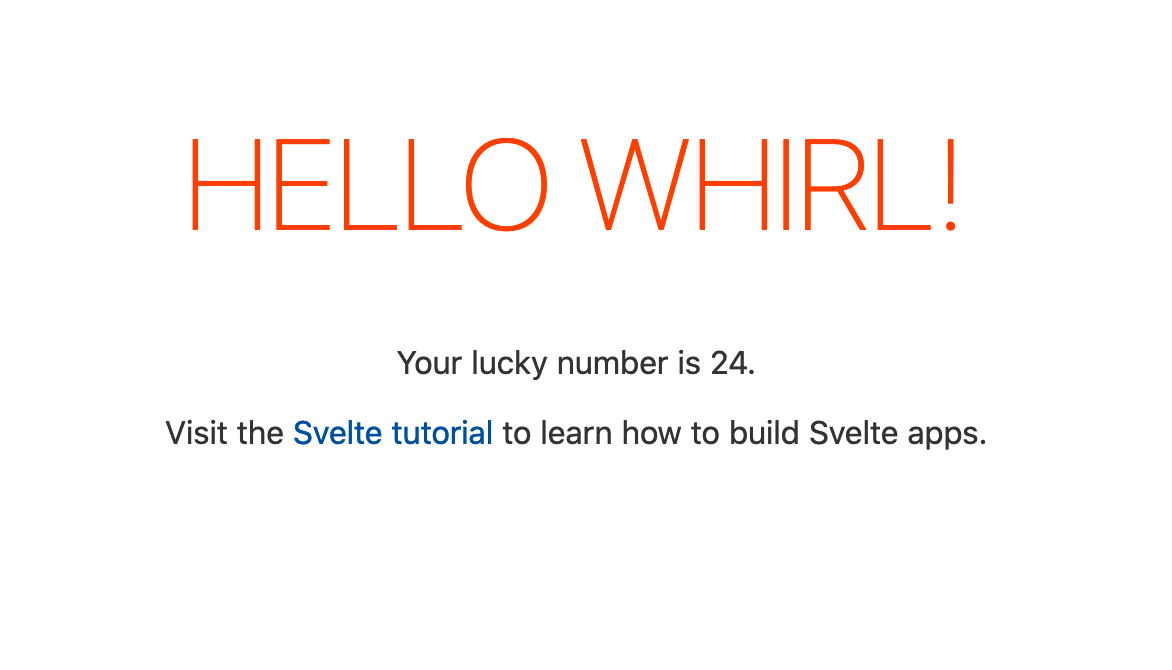
|
|
|
|
Several discoveries here:
|
|
|
|
1) `$capture_state` gives the current state of the app as an object.
|
|
2) `$set` and `$inject_state` seem to both update the app's state via an object.
|
|
3) `dirty`, when it's not equal to `[-1]`, is a positive integer seemingly referring to the props by a 1-based index.
|
|
4) These props are updated in the rendered page.
|
|
|
|
One more mystery to unravel:
|
|
|
|
```js
|
|
>> app.name
|
|
Error: <App>: Props cannot be read directly from the component instance unless compiling with 'accessors: true' or
|
|
'<svelte:options accessors/>'
|
|
>> app.name = 'hi'
|
|
Error: <App>: Props cannot be set directly on the component instance unless compiling with 'accessors: true' or
|
|
'< svelte:options accessors/>'
|
|
```
|
|
|
|
That's the purpose of the `set` and `get` methods from earlier: Enforce that the compiled code doesn't set and get props directly on the `App` instance, but that it uses... the included machinery?
|
|
|
|
# Next Time
|
|
|
|
Join us next time to unwrap the mysteries of
|
|
|
|
1) What is the difference between `app.$set` and `app.$inject_state`, if any?
|
|
2) How does `bundle.js` change with increasing app complexity? Multiple components, for example, or dynamically re-rendering props/state.
|
|
3) What is `__svelte_meta` for?
|
|
4) Where and when does `mount` actually get called?
|
|
5) Can `dirty` ever contain anything besides a single integer? In other words, are elements updated one after the next, or can `update` sometimes operate on more than one element at a run?
|
|
6) When are components and elements destroyed? Are Svelte and Rollup as efficient about unnecessary re-renders as billed?
|
|
7) How does all this fit together? Asked another way, is it possible to have a basic understanding of how a web framework we use actually works?
|
|
|
|
# Random Notes
|
|
[According to Svelte's tweet response to me](https://twitter.com/zevav/status/1202593636631941123), the events emitted at various points in `bundle.js` are strictly for dev tooling. This is why we can ignore them.
|
|
|